 Ozmium Docs
Risk
Leveraged perpetuals on Gains Network gTrade through Ozmium - sizing against real volatility, liquidation mechanics, managing a live position, and honest risk.
Leverage is the highest-risk thing you can do in this app, so this page is going to spend more time on how it goes wrong than on how it goes right.
Leveraged perpetuals come from Gains Network gTrade, using USDC as collateral. You post margin, pick a direction and a multiplier, and hold a position that has no expiry date. Position size is simply your margin times your leverage.
The Arithmetic You Cannot Argue With
| Leverage | Adverse Move that Erases Margin |
|---|---|
| 2x | 50% |
| 5x | 20% |
| 10x | 10% |
| 25x | 4% |
| 50x | 2% |
| 100x | 1% |
| 200x | 0.5% |
Figures exclude spread, opening fees, and rollover, all of which move the real liquidation point closer.
Six Asset Classes
Ozmium surfaces the tradeable gTrade markets across:
- Crypto
- Forex majors and crosses
- Energy - oil, gas, uranium
- Metals - gold, silver, copper, miners
- Indices
- Stocks
Each market has its own maximum leverage and spread, readable at GET /v1/risk/pairs.
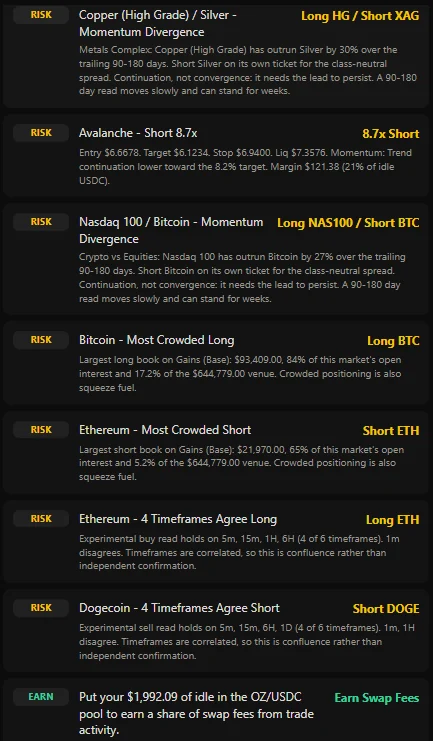
That feed is the Ideas list, and it is documented in full there - how rows are ranked, what each tag means, and why a play you expected is missing. Read its caveats rather than its headlines. The multi-timeframe entries say plainly that timeframes are correlated, so agreement across them is confluence rather than independent confirmation. That is the sort of qualification most signal products leave out.
Sizing against Real Volatility
The most useful thing in this whole app is the sizing read sitting under the order ticket. The ticket will happily let you do something stupid; the sizing read is what talks you out of it.
Suggested leverage comes from the market's recent realized volatility, not from a round number that felt right. A market that routinely swings 6 percent in a day simply cannot carry the same multiplier as one that moves 0.6 percent, and pretending otherwise is how positions are liquidated.
Survival sizing answers the question you actually care about: given how far this market has really moved lately, what size gets through a move like that without being liquidated? Treat it as a ceiling rather than a promise. Markets exceed their own history all the time, and a past range has never once been obliged to contain a future price.
Liquidation price is on the ticket before you sign.
Opening a Position
- Pick the market and direction.
- Set margin in USDC and choose leverage. Check the suggested leverage and the survival read.
- Set a take profit and a stop loss. Do this at open, not later.
- Review the liquidation price. If it sits inside a move you consider likely, the size is wrong.
- Approve USDC if needed, then sign.
Ozmium handles the exact scaling gTrade requires - leverage at 1e3, prices at 1e10, USDC at 6 decimals, slippage at 1e3. Getting these wrong is the most common cause of a reverted or wildly mis-sized position when integrating gTrade directly.
Managing an Open Position
You can modify a live position without closing it:
- Move a stop to breakeven once the trade is working.
- Re-aim a target as conditions change.
- Change leverage. Decreasing leverage requires a collateral top-up, and Ozmium prepends the USDC approve automatically.
Managing beats paying a full round trip to adjust. Closing and reopening costs spread, fees, and execution risk.
Costs that Accrue
| Cost | When |
|---|---|
| Spread | At Open and at Close |
| Opening Fee | At Open |
| Rollover / Funding Fee | Continuously while the position is open |
| Gas | Per Transaction |
Rollover matters. The displayed liquidation price excludes rollover and borrow fees, which means your real liquidation point drifts closer over time on a position you leave alone.
Liquidation
Gains liquidates a position when its margin can no longer cover losses. This is enforced onchain by the protocol. Ozmium does not liquidate anyone, cannot stop a liquidation, and has no discretion in the matter.
A stop loss is not a guarantee either. In a fast gap, the fill can be worse than the stop, or the position can reach liquidation before the stop executes.
Signal and Marker Feed Disclosure
Ozmium publishes multi-indicator technical reads - RSI, MACD, Bollinger bands, VWAP, trend, candle patterns - reduced to a directional bias and a conviction score. It also publishes ranked long and short setups across every category.
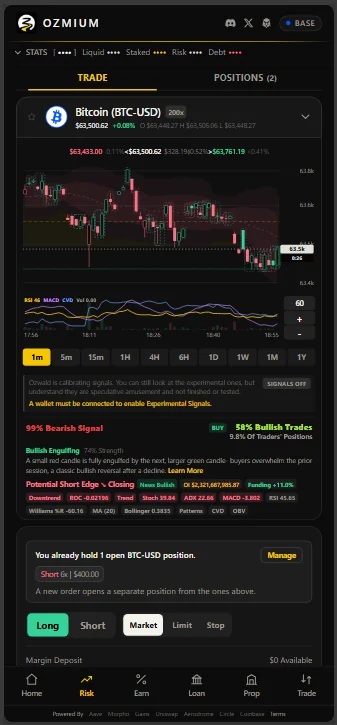
The app says it plainer than any documentation would:
Ozwald is calibrating signals. You can still look at the experimental ones, but understand they are speculative amusement and not finished or tested.
Signals ship off. A wallet has to be connected before experimental signals can be turned on, which is a deliberate speed bump rather than an oversight. Nothing here is financial advice, there is no established out-of-sample edge, and the interface is not going to pretend otherwise while you are looking at a 200x market.
Sharing a Result
Closed positions can be rendered as a share card carrying the market, direction, leverage, entry price, mark price, and result, with the wallet shown truncated and marked verified.
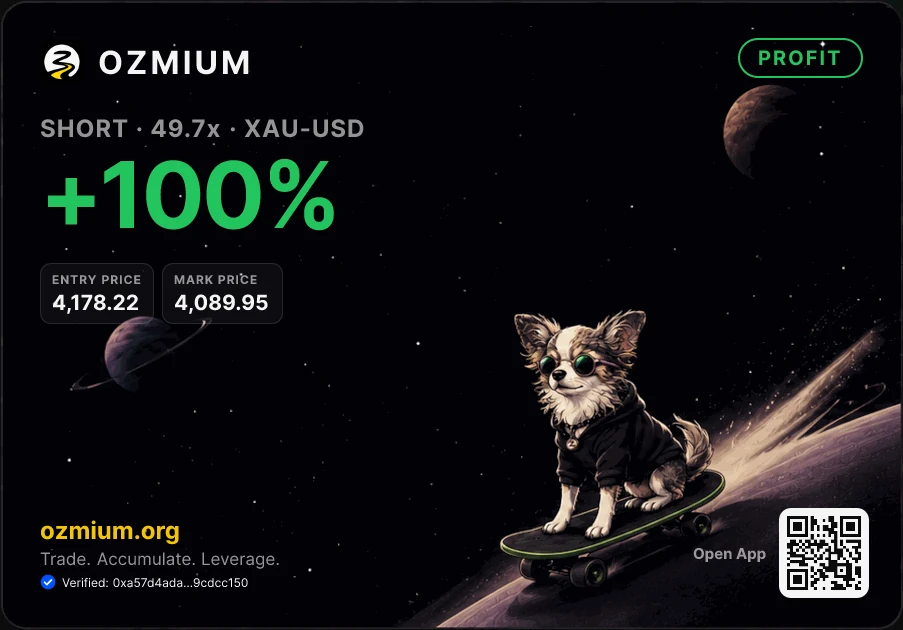
The leverage multiplier is on the card deliberately. A percentage without the leverage behind it is not a claim anybody can evaluate, and a card that showed only the gain would be advertising rather than a receipt.
Reading a Position
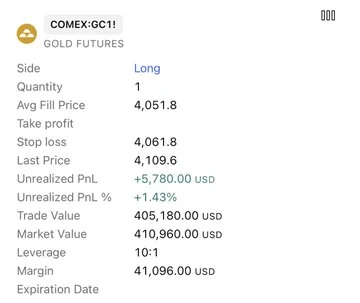
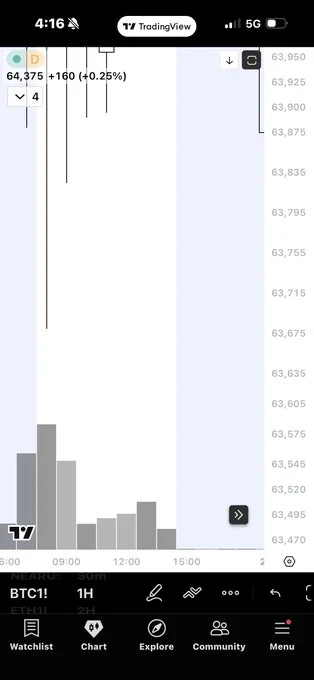
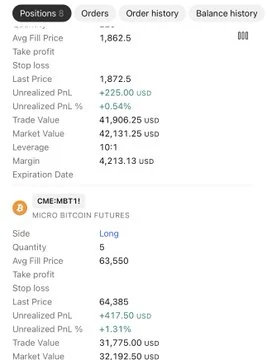
A position card states the figures that decide the outcome: average fill, stop, last price, unrealized profit and loss in absolute and percentage terms, trade value, market value, leverage, and margin. A result means nothing without the leverage and margin beside it, which is why they sit on the same card rather than behind a settings screen.
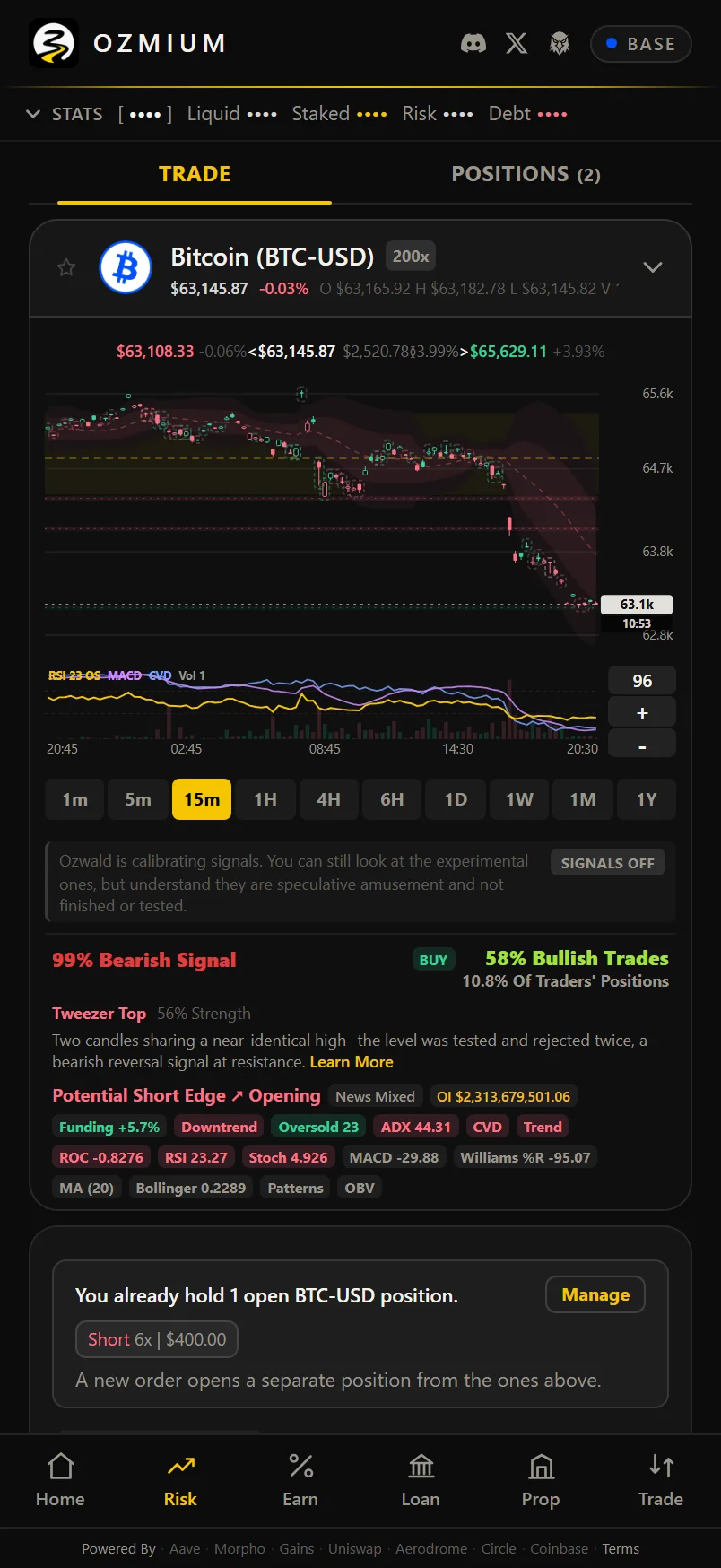
The middle card is the entry bar for that Bitcoin position, and it lands near the bottom of a lower wick. The trade was the operator's own decision after reading market data and news, not a call the agent made. What the system supplied was the thing that made a decision like that available at all: the usual technical reads and the news that moves them, in one place, against the same live data the transaction is then built from.
That is the argument for the whole design rather than for any single trade. Applying financial theory to living market data is only useful if every action in the cycle, lending, staking, swaps, and leverage, resolves in the same place for a person and for a bot. Doing that well produces a specialized dataset as a byproduct, and the same reads have obvious applications beyond trading, in onchain economies and GameFi systems that need to model markets rather than merely display them.
Serving that dataset quickly is one of the things the node program in the Litepaper exists to do.
Reclaim a Stranded Order
A market order placed while its venue is closed sits with the keeper unfilled. If it never fills and never auto-refunds, the collateral escrowed against it is stuck, and in most interfaces it is also invisible: the backend that serves position data does not report pending orders at all, so the money simply appears to be gone.
Ozmium reads pending orders straight from the Gains diamond contract rather than from any backend, which is why a stranded order shows up here at all. Once the execute timeout has passed, Reclaim cancels the order onchain and returns the escrowed collateral to your wallet. On a smart wallet the call is batched so a gas-sponsored account can make it, which a raw write cannot.
Nothing about this is a favor Ozmium does for you. The cancel is a function on the venue's own contract and the funds were always yours; the interface's contribution is showing you the order exists and building the transaction that frees it.
Pending Orders Are Not Positions
A resting limit or stop order holds collateral but is not an open position. They are listed separately in the app and served by a separate endpoint. Treating them as the same thing is a classic error in both human portfolio math and agent integrations.
Underlying Protocols

FAQ
How does leverage work on Ozmium?
Leverage is provided by Gains Network gTrade using USDC as collateral. You post margin and open a long or short perpetual on a supported market; position size equals margin times leverage. Ozmium builds the transaction and your own wallet signs it.
What is the maximum leverage on Ozmium?
Up to 200x, depending on the market. Each gTrade pair has its own maximum leverage and spread,
readable at GET /v1/risk/pairs. Maximum available is not a recommendation - at 200x a 0.5 percent
move liquidates the position.
How is the liquidation price calculated?
Gains liquidates when a position's margin can no longer cover its losses. Ozmium shows the liquidation price before you sign, but that figure excludes rollover and borrow fees, which accrue continuously and move the real liquidation point closer over time.
What is Auto Leverage?
Auto Leverage derives a suggested multiplier from the market's realized volatility over a window you choose, rather than from a round number you picked. It answers what size survives how far this market has genuinely moved. It is a floor, not a guarantee - markets exceed their history routinely.
Does a stop loss guarantee my exit price?
No. In a fast gap the fill can be worse than the stop, or the position can reach liquidation before the stop executes. A stop tells the venue when to act. What it fills at is decided by the market.
Can I change leverage without closing the position?
Yes. modify adjusts take profit, stop loss, or leverage on an open position. Decreasing leverage
requires a collateral top-up, and Ozmium prepends the USDC approve automatically.
What markets can I trade with leverage?
Crypto, forex majors and crosses, energy including oil, gas and uranium, metals including gold, silver, copper and miners, indices, and stocks - six asset classes through gTrade.
For Agents
GET /v1/risk/pairs- tradeable pairs with pairIndex, max leverage, and spread.GET /v1/positions/{address}- open positions with size, leverage, liquidation price, and PnL.GET /v1/pending-orders/{address}- resting orders that have not filled.GET /v1/history/{address}- closed-trade ledger with exit reason (TP, SL, LIQ).GET /v1/stats/{address}- win rate, profit factor, expectancy, best and worst.POST /v1/tx/risk/open,/close,/modify- position lifecycle calldata.
See Endpoint Catalog.
Related
-
Charts - how to read the chart, its indicators, and what a BUY or SELL marker means
-
Loan - leverage with a different liquidation model
-
Terms And Risk - read this before using leverage