 Ozmium Docs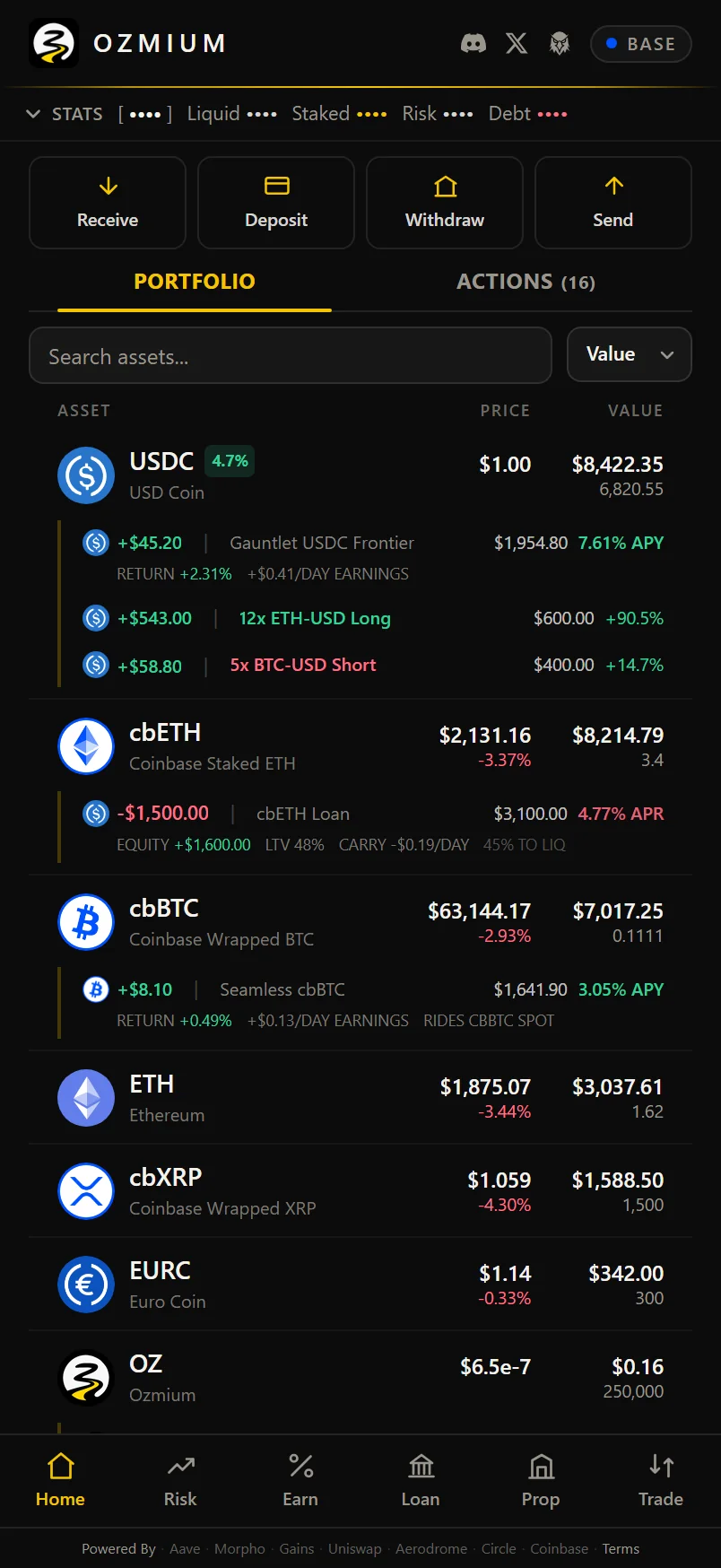
Home
The Ozmium portfolio view - how balances, vault positions, loans, and leveraged trades roll into one list, and why a value sometimes reads as unavailable.
Home is the ledger, with the Ideas list sitting above your action history. Every asset you hold on Base, with anything you have done with that asset nested underneath it.
Why Positions Are Nested
Most interfaces put balances on one screen and positions on another, which means answering "how much USDC do I actually have free" requires holding two screens in your head at once.
Here, a vault deposit, a loan, and an open perp all appear under the asset they draw on. Your USDC row shows the USDC sitting idle, and directly beneath it the vault earning at some APY and the leveraged position using it as margin. The bar across the top totals the same information: liquid, staked, financed, and at risk.
When a Value Reads as Unavailable
Sometimes a figure shows as -- or as a last-known value instead of a number.
That is deliberate. When a price feed or an RPC call fails, Ozmium keeps the last good value and marks
it instead of printing a confident $0.00. A wrong zero is more dangerous than a blank, because a
blank makes you check and a zero makes you act.
The same rule applies to tokens with no liquid market. You will see the balance without a confident dollar valuation. That is correct, not broken.
Tokens that Do Not Appear
The ledger is arranged to answer one question: what is your equity, and where is it working. That is why positions nest under the asset funding them, and why the top bar totals liquid, staked, financed, and at-risk value instead of listing every token you have ever touched.
It also reads Base mainnet only. If your address holds assets on Ethereum, Arbitrum, Solana, or anywhere else, those balances are untouched and entirely safe, but they will not appear here, because this app does not read those networks. The same is true of a Base token with no liquid route, which may show a balance without a confident valuation.
So if something is missing, nothing has gone wrong and nothing has been lost. Look the address up on Basescan for the complete Base picture, and use a block explorer for whichever network the rest of it is on. The chain is always the authority.
Action History
Past actions are recorded separately, so you can see what you did and when without reading them out of your balances.